A chunked Android speech-translation application with a Kivy client and Whisper/FastAPI backend.
ShaTranZ is an Android speech-translation project built around a simple user interaction:
choose the language being spoken, press the bolt-shaped record button, and let the application
record, upload, translate, display, and speak the result. The interesting part of the project is
not one isolated model; it is the end-to-end system connecting Android audio capture, a Python
mobile interface, an HTTP backend, Whisper translation, and text-to-speech.
Implementation note. The project materials describe the system as “real-time,” but the
current client actually works in alternating 15-second recording chunks. That makes it better
described as chunked near-real-time translation: while one chunk is being uploaded and
processed, the next chunk is already being recorded.
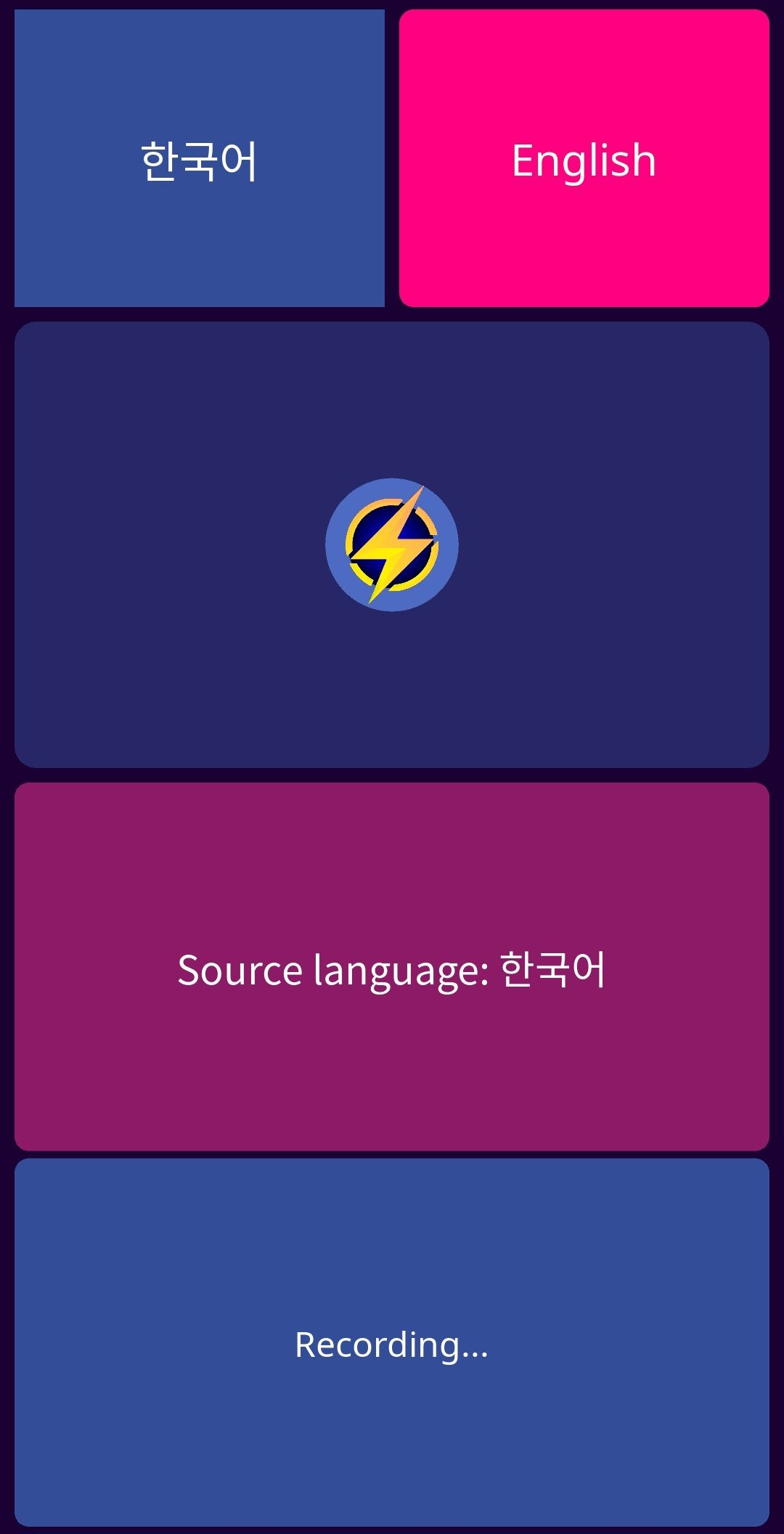
The mobile interface is intentionally small. A language spinner selects the source language,
the center bolt button starts and stops recording, and the lower panels show translation/status
information.
The app also switches fonts according to the script it sees, using separate Noto fonts for
Arabic, Devanagari, and CJK text instead of assuming one Latin font will render every language.
The Android interface shown in the original project presentation.
2. System architecture
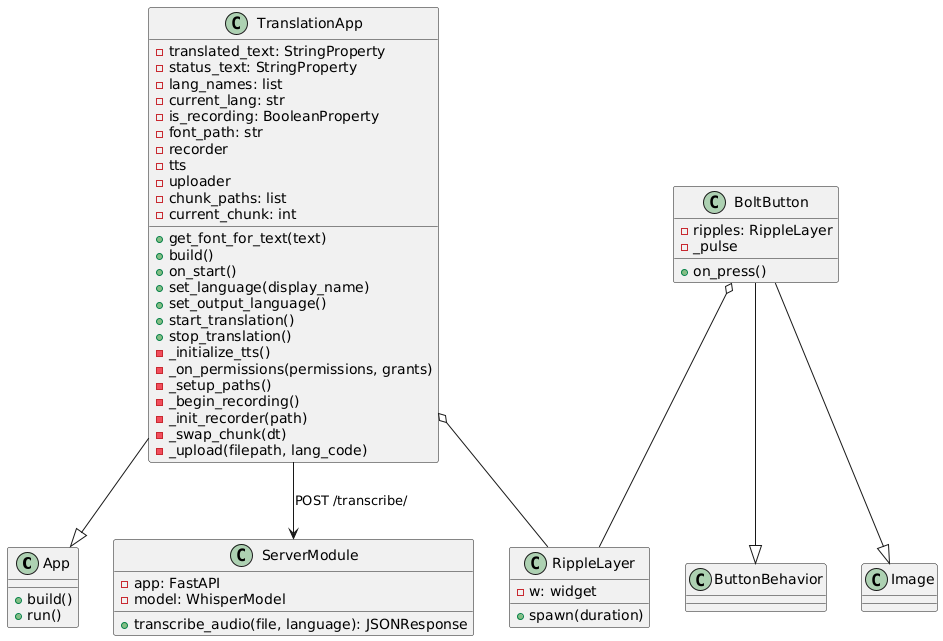
The supplied class diagram captures the intended division between the mobile application, the
record button/ripple UI, and the backend service. The current source has evolved slightly from
the diagram: the backend is now a function-based FastAPI module rather than a
ServerModule class, but the architectural separation is the same.
Original project class diagram supplied with ShaTranZ.
At runtime the data path is:
Stage
What happens
1. Android microphone
The Kivy app records a 3GP/AMR-NB audio chunk through Android's MediaRecorder.
2. Background upload
The completed chunk is POSTed to the FastAPI /transcribe/ endpoint with the selected source-language code.
3. Whisper
The server asks Whisper to process the audio and separately invokes Whisper's translation task.
4. Translation response
The backend returns translated English text and also synthesizes a WAV response with Google Cloud Text-to-Speech.
5. Android UI / speech
The client updates the translated-text panel and currently speaks the returned text with Android's local TextToSpeech engine.
3. The Android client
The client is written in Python with Kivy. The layout itself is defined inline in a KV string:
a source-language spinner, an English output button, a large custom bolt button, and two scrollable
text regions. The bolt button combines ButtonBehavior with a Kivy Image and
adds an animated ripple layer while recording.
main.py — the record button is also the state switch
class BoltButton(ButtonBehavior, Image):
    def on_press(self):
        if self._pulse is None:
            self.ripples.spawn()
            self._pulse = Clock.schedule_interval(
                lambda dt: self.ripples.spawn(), 1.5
            )
        else:
            self._pulse.cancel()
            self._pulse = None

        app = App.get_running_app()

        if app.is_recording:
            app.stop_translation()
        else:
            app.start_translation()
This is a nice example of the UI and recording state being deliberately coupled: the same user
action that starts the visual pulse also starts audio capture, and the second press stops both.
4. How the “continuous” recording works
The most interesting implementation detail is the two-file chunk swap. The app allocates
chunk1.3gp and chunk2.3gp. Every 15 seconds it stops the current recorder,
switches to the other file, immediately starts recording again, and uploads the completed file on
a background thread.
This is effectively a small double-buffering scheme. Network/Whisper latency does not have to
block the microphone because the next chunk is being recorded while the previous chunk is in
flight. It does, however, mean the translation granularity is determined by the 15-second chunk
boundary rather than by individual utterance boundaries.
Android's recorder is configured for the microphone, 3GP output, and AMR-NB audio:
The backend is compact: FastAPI receives one uploaded audio file and a language code, stores the
upload in a temporary file, runs Whisper, synthesizes speech, and returns JSON.
The current endpoint actually invokes Whisper twice. The first call produces a source-language
transcription, but that value is not returned to the app; the second call uses
task="translate" and the translated text is what is sent back. As written, the effective
translation target is therefore English.
6. Where text-to-speech happens
There are two TTS paths in the project materials. The server uses Google Cloud Text-to-Speech and
returns base64-encoded WAV audio. The current Android client, however, does not decode or play that
audio_base64 field. It reads only translated_text and speaks that string with
Android's local TextToSpeech object.
So the current repository contains a server-generated audio path and a client-local audio path,
but only the client-local path is consumed by the Android app. That is worth documenting because
the original user guide describes the backend audio response as part of the main flow.
7. Packaging and deployment
The Android package is configured with Buildozer / python-for-android. The project includes a
debug APK for ARM64 and ARMv7 devices, and the manifest requests Internet and microphone access.
The supplied build configuration targets portrait orientation and packages the multilingual Noto
fonts together with the bolt artwork.
The server is an ordinary Uvicorn/FastAPI application. The project materials describe deployment
on a Google Cloud VM, and the repository also contains a Render deployment file. The mobile client
currently uses a fixed backend address in main.py, so changing deployments requires
changing or externalizing that endpoint.
8. Current limitations and natural next steps
The original backlog and presentation are useful here because they match what the source code
shows. The project reached the point where audio capture, mobile UI, backend speech recognition,
translation, and spoken playback are connected, but several pieces remain prototype-level.
Chunk latency. Recording is swapped every 15 seconds, so “real-time” is approximate rather than streaming token-by-token or utterance-by-utterance.
Output language. The UI contains an English output button, but set_output_language() currently only updates display text; the backend translation path itself targets English.
Duplicate speech processing. The server performs a normal Whisper transcription and a second Whisper translation pass, while only the translated result is returned.
TTS duplication. The server generates Google Cloud TTS audio, but the client currently ignores it and uses Android TTS instead.
Endpoint configuration. The client backend address is hard-coded rather than supplied by configuration.
Transport. The checked-in client configuration uses plain HTTP rather than HTTPS.
Those limitations actually make the project more interesting as a coding page: it is a complete
working systems prototype with visible engineering tradeoffs, rather than a polished demo that hides
how the pieces fit together.
Source map
Path
Purpose
main.py
Kivy UI, Android permissions, language/font selection, MediaRecorder, chunk swapping, upload, and local TTS.
server.py
FastAPI endpoint, Whisper transcription/translation, Google Cloud TTS, JSON response.
buildozer.spec
Android packaging, permissions, fonts/assets, supported CPU architectures.
render.yaml
Alternate web-service deployment configuration.
assets/
Noto fonts used for multilingual rendering.
bin/
Compiled Android debug APK.
Security note for the website package: the source archive contains a cloud-credential file.
It is intentionally not copied into this website package and is not linked from this page.
These pages are selective technical manuals: enough source to expose the mechanism, not a mirror of the entire repository. Last updated: September 14, 2026.